Background
GUI, API and infrastructure as code
Breqwatr Cloud has one API and several ways to drive it. The Breqwatr Cloud Portal (Strata) is the quickest way to do something once. The CLI is the quickest way to script it. Infrastructure as code describes a whole environment so it can be built again, reviewed and changed with confidence.
One API behind every tool
Every resource on Breqwatr Cloud is created, changed and deleted through the OpenStack APIs. The tools differ in how you tell the API what you want.
- The portal is a graphical interface. You fill in a form, and the portal makes the API calls for you.
- The OpenStack CLI is a command-line tool. Each command makes one or more API calls, and commands can be put in a script.
- Infrastructure as code (IaC) tools such as OpenTofu read files that describe what should exist. OpenTofu, the open-source fork of Terraform, compares that description with what does exist, then makes the calls needed to close the gap.
The first two are imperative: you say what to do, step by step. IaC is declarative: you say what the end result should be, and the tool works out the steps. That difference is what makes IaC repeatable. Running the same OpenTofu files twice leaves one security group rule, not two.
| Breqwatr Cloud Portal | OpenStack CLI | OpenTofu | |
|---|---|---|---|
| Best for | Exploring, one-off changes, checking what exists | Quick tasks, lookups, small scripts | Whole environments that need to be built more than once |
| You describe | Each change, in a form | Each change, as a command | The end state, in files |
| Repeating it | By hand, step by step | By running the script again | By applying the same files |
| Record of what was done | What you write down | Shell history, or the script | Files in version control, reviewed like code |
| Knows what exists | Shows current state | Asks the API when you run a command | Tracks what it created in its state |
The same task in each tool
The task: allow HTTPS (TCP port 443) into an existing security group called web-servers, from the address range 203.0.113.0/24. That range is reserved for documentation; use your own.
- Open the project, then Security Groups.
- Click
web-serversto open the group. - Click Add rule.
- Set Protocol to TCP, Open Port to Port, Port to
443and Source CIDR to203.0.113.0/24. - Click Add rule.
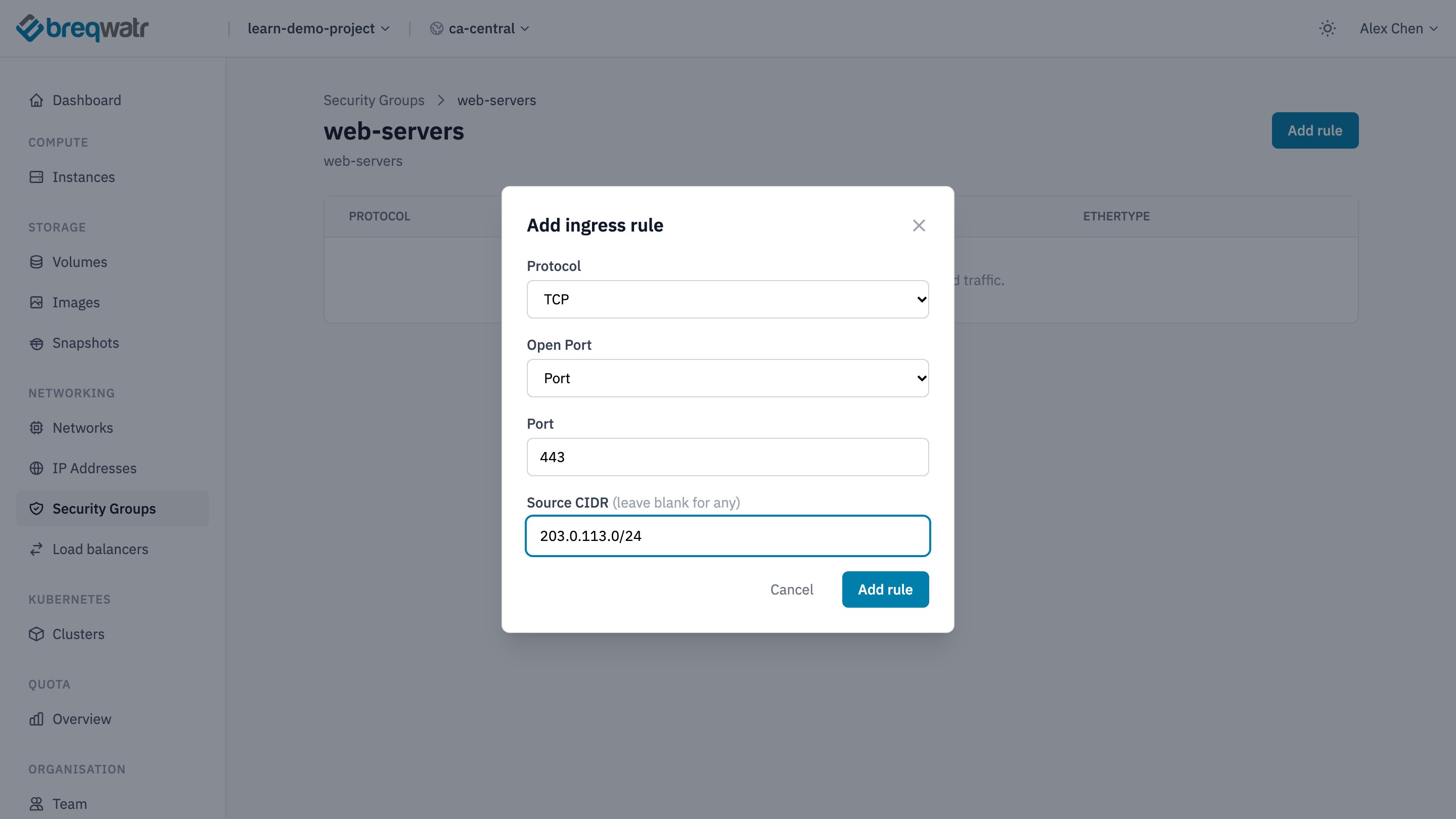
The rule appears on the group's page and applies to every instance in the group straight away.
openstack --os-cloud <cloud-name> security group rule create --ingress --protocol tcp --dst-port 443 --remote-ip 203.0.113.0/24 web-servers
The command is on one line so it runs unchanged in PowerShell on Windows and in a shell on macOS or Linux. Check the result with:
data "openstack_networking_secgroup_v2" "web_servers" {
  name = "web-servers"
}

resource "openstack_networking_secgroup_rule_v2" "https_in" {
  security_group_id = data.openstack_networking_secgroup_v2.web_servers.id
  direction         = "ingress"
  ethertype         = "IPv4"
  protocol          = "tcp"
  port_range_min    = 443
  port_range_max    = 443
  remote_ip_prefix  = "203.0.113.0/24"
}
Preview the change, then make it:
Provider setup is left out here; OpenTofu fundamentals covers it.
All three leave the same rule in place. What differs is what's left behind afterwards:
- The portal: the rule exists. Why it exists, and who asked for it, lives wherever someone wrote it down.
- CLI: the command can be saved in a script and run again in another project. Run it twice in the same project, though, and the second run either fails or adds a duplicate; which one varies by resource.
- OpenTofu: the file can be reviewed before it's applied, kept in version control, and applied to another project to get the same result. If someone deletes the rule in the portal, the next
tofu planshows it as missing andtofu applyputs it back.
On Breqwatr Cloud
- The portal covers your account as well as your resources: organisations, team members, quotas and billing all live there.
- The OpenStack CLI authenticates with an application credential, stored in a
clouds.yamlfile. Application credentials and clouds.yaml and Install the OpenStack CLI set both up. - OpenTofu uses the OpenStack provider and the same
clouds.yaml. OpenTofu fundamentals builds on this page. - Ansible uses the
openstack.cloudcollection to create resources through the same API, and is also the tool the course uses to configure software inside instances. See Configuration with Ansible.
The tools can be mixed. A common pattern is the portal for looking, the CLI for quick checks, and IaC for anything that should be built the same way twice. A resource is easiest to manage when one tool owns it: a change made in the portal to an OpenTofu-managed resource is undone by the next tofu apply.
Impact
- An environment described in code can be built again in another project or region, or rebuilt after a failure, from the same files.
- Changes can be reviewed before they happen, the same way application code is.
- The files become the documentation of what exists and why, kept up to date because they're what builds it.
Common anti-patterns
- Production built only by hand: an environment built through the portal alone can't be rebuilt the same way, because the steps were never recorded.
- Two tools, one resource: editing an OpenTofu-managed resource in the portal. The next apply reverts the change, or the files stop describing what's really there.
- Credentials in code: an application credential secret written into a
.tffile or a script and committed to version control. Keepclouds.yamloutside the repository. - Create-only scripts: CLI scripts that create resources without checking what already exists, so re-running them creates duplicates or fails partway.
Related Well-Architected pillars
- Operational excellence: changes that are written down, reviewed and repeatable.
- Reliability: an environment in code can be rebuilt after a failure.
- Security and sovereignty: reviewed changes and credentials kept out of code.
Further reading
- Security groups: groups and rules in the portal, the CLI and OpenTofu.
- Install the OpenStack CLI: installing the CLI and loading credentials.
- APIs and tools: the CLI, the OpenStack provider and the Ansible collection used with Breqwatr Cloud.
- OpenStack provider for OpenTofu: upstream reference for every resource type.