How-to
Create a cluster
Create a Kubernetes cluster with BKS, connect to it with kubectl, change its number of worker nodes, and delete it.
BKS creates the cluster's control plane and worker nodes as instances in your project, with the networking and storage drivers it needs. Breqwatr runs the management cluster that provisions BKS clusters. Once your cluster exists, you own it, control plane included, along with everything you run on it: upgrades, add-ons and workloads are yours to manage.
Before you start
- Access to the project, and enough quota for the nodes: each node is an instance with its own boot volume, so it counts against instances, vCPUs, memory and storage. See Quotas and limits.
kubectl, from the Kubernetes documentation, on Windows, macOS or Linux.- For the CLI and OpenTofu: an unrestricted application credential, and the
python-magnumclientplugin installed in your OpenStack CLI virtual environment (pip install python-magnumclient).
Unrestricted application credentials
Creating a cluster from the CLI or OpenTofu needs an unrestricted application credential, because BKS creates credentials of its own for the cluster. An unrestricted credential can also create and delete other application credentials in your name, so anyone who holds it can keep access after you revoke it. Give it an expiry, keep it only where cluster automation runs, and use restricted credentials for everything else: see Application credentials and clouds.yaml.
Pick a cluster template
A cluster template sets the Kubernetes version and the node image. Its name gives both, such as debian-13-v1.36.1: Kubernetes 1.36.1 on Debian 13. Pick the newest version your workloads support.
Create the cluster
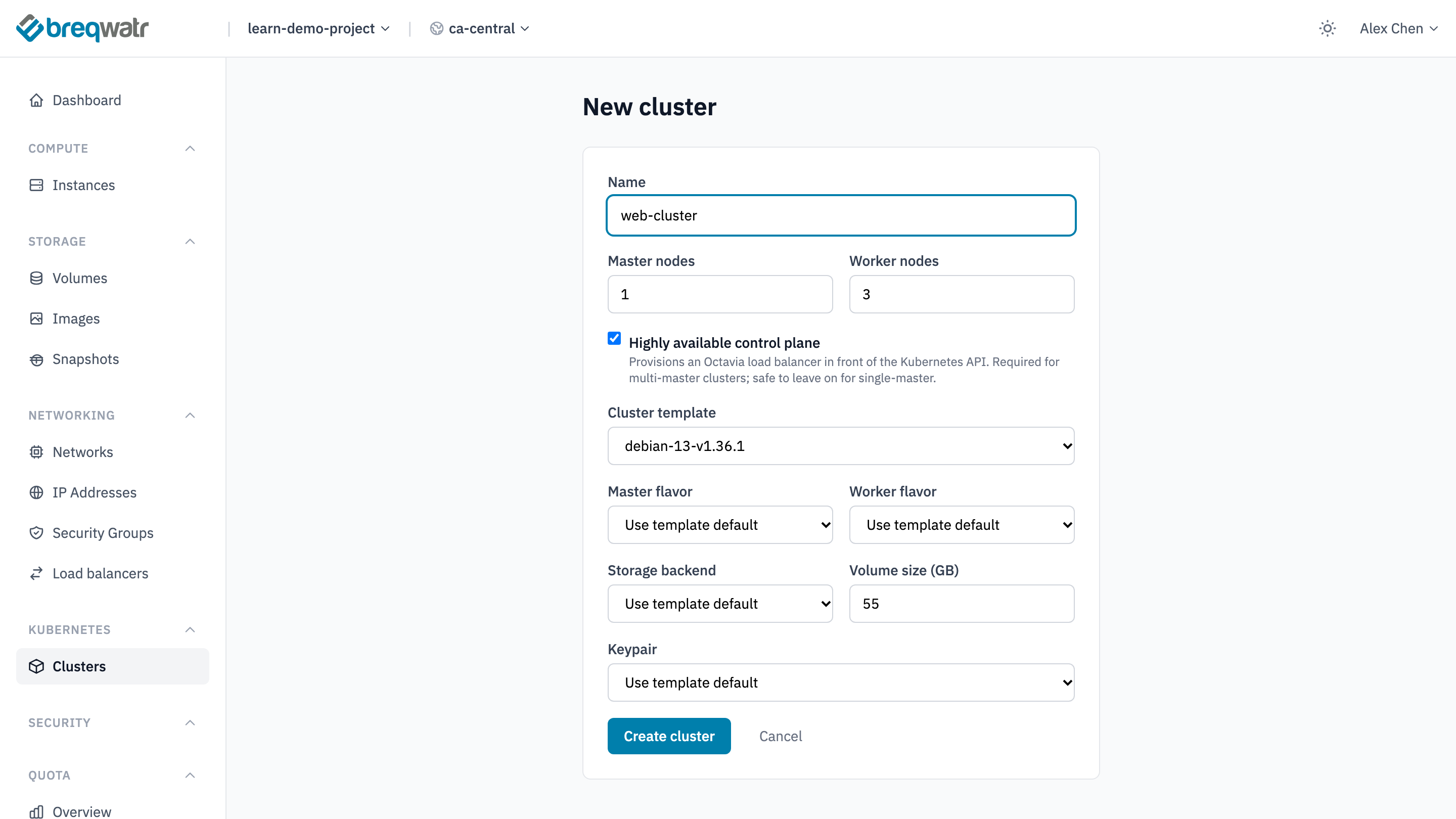
- In the Breqwatr Cloud Portal (Strata), open Clusters and choose New cluster.
- Enter a Name, such as
web-cluster. - Set Master nodes, the control plane, and Worker nodes. One control plane node is enough to try BKS; use three for a cluster you depend on.
- Leave Highly available control plane ticked. It puts a load balancer in front of the Kubernetes API, and a cluster with more than one control plane node needs it.
- Pick the Cluster template.
- Leave Master flavor and Worker flavor on Use template default, or pick the flavours your workloads need. Leave Storage backend on Use template default.
- Volume size (GB) is each node's boot volume. It starts at 55.
- Pick a Keypair from your SSH keys if you want to reach the nodes over SSH, and choose Create cluster.
openstack --os-cloud <cloud-name> coe cluster create web-cluster \
  --cluster-template debian-13-v1.36.1 \
  --master-count 1 --node-count 3 \
  --keypair <key-name>
--flavor and --master-flavor choose the workers' and the control plane's flavours instead of the template's.
data "openstack_containerinfra_clustertemplate_v1" "k8s" {
  name = "debian-13-v1.36.1"
}

resource "openstack_containerinfra_cluster_v1" "web" {
  name                = "web-cluster"
  cluster_template_id = data.openstack_containerinfra_clustertemplate_v1.k8s.id
  master_count        = 1
  node_count          = 3
  keypair             = "<key-name>"
}
The resource's kubeconfig attribute holds what kubectl needs, so keep the state as safe as the cluster.
A cluster takes about 10 minutes to create. Its status is CREATE_IN_PROGRESS, then CREATE_COMPLETE, shown in the portal as Healthy.
Connect with kubectl
The kubeconfig holds an administrator's certificate for the cluster: keep it private. Point kubectl at it and list the nodes:
Every node shows Ready: one with the role control-plane, and the workers.
Change the number of workers
The status shows UPDATE_COMPLETE before new workers have joined. Check with kubectl get nodes: a new worker shows Ready a couple of minutes later. To grow and shrink the workers with demand instead, see Cluster autoscaling.
Delete the cluster
Deleting a cluster deletes its nodes and their boot volumes. Volumes that workloads created through persistent volume claims, and load balancers created for LoadBalancer Services, belong to the project rather than the nodes: delete those Kubernetes objects before you delete the cluster, or remove what's left from Volumes and Load balancers afterwards.
Check it worked
openstack --os-cloud <cloud-name> coe cluster listshows the cluster asCREATE_COMPLETE, or the portal shows Healthy.kubectl get nodeslists every node asReady.kubectl get pods -n kube-systemshows the cluster's system pods running, includingcalico,corednsandopenstack-cinder-csi.
Related
- Kubernetes on BKS: a first workload on a cluster.
- Shared responsibility: what you own on a BKS cluster.
- Cluster autoscaling: add and remove workers automatically.
- Gateway API: route traffic into the cluster.