How-to
Networks and routers
Create a private network for your instances, with a subnet that hands out addresses and a router that connects it to the internet.
Every project has a network named default, with the range 10.0.0.0/24 and a router, in each region it uses. Create more networks to keep workloads apart, such as one for an application and one for its database, or to give a workload address ranges of its own. A network is in one region.
Before you start
- Access to the project.
- An address range for the network, such as
10.0.1.0/24: a private range that doesn't overlap the project's other networks, or any network you'll connect to it, such as your office's over a VPN.
Create a network
The portal creates the network, its subnet and its router together. The CLI and OpenTofu create each one.
- In the Breqwatr Cloud Portal (Strata), open Networks and choose New network.
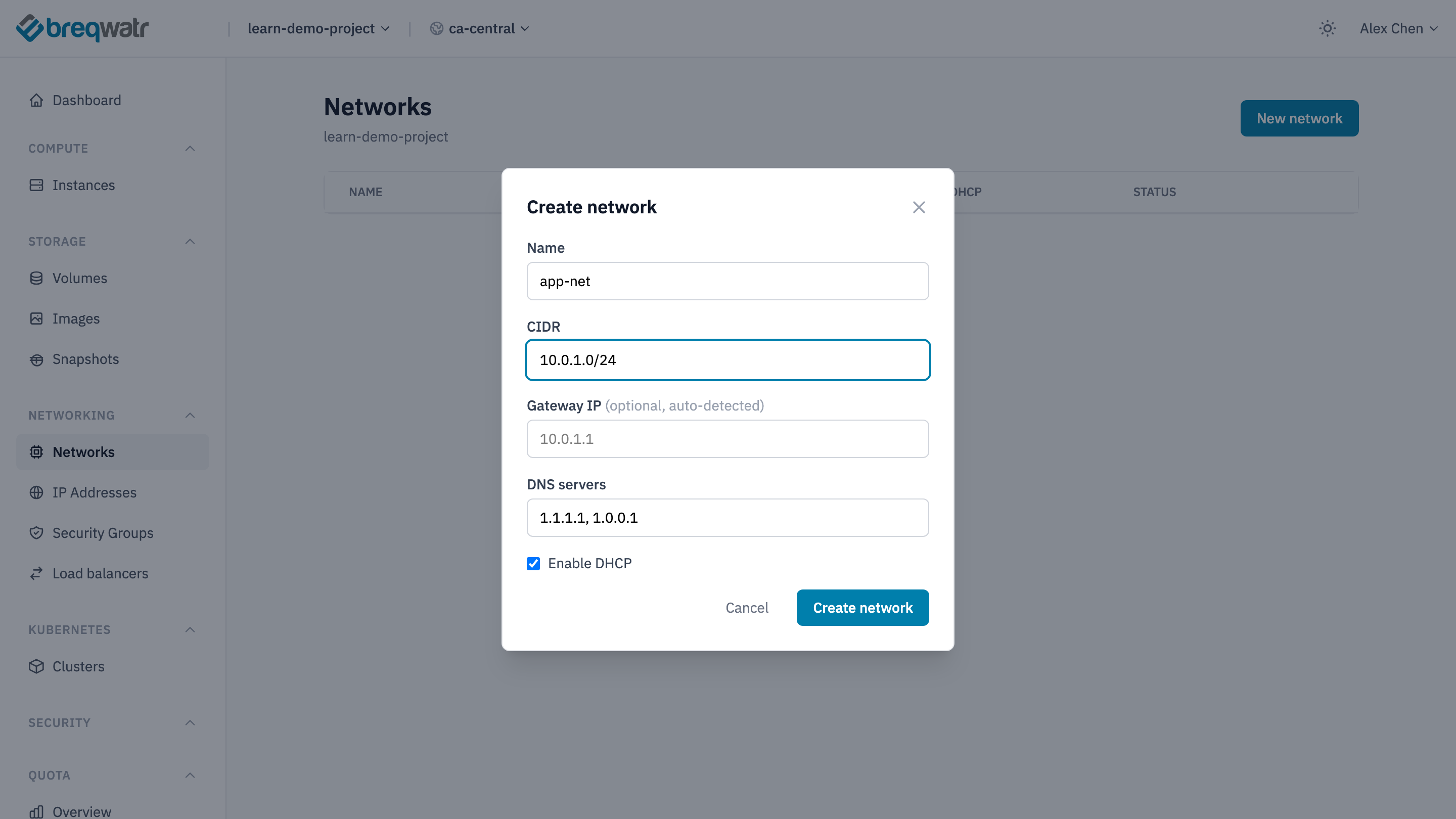
- In Create network, fill in:
- Name:
app-net. - CIDR: the address range, such as
10.0.1.0/24. - Gateway IP: leave blank to use the range's first address, such as
10.0.1.1. - DNS servers: leave the default, or see DNS servers below.
- Enable DHCP: leave ticked, so instances get their addresses automatically.
- Name:
- Choose Create network.
The portal makes the network app-net, the subnet app-net-subnet, and the router app-net-router, connected to the subnet and to the internet.
Find the external network that connects routers to the internet:
Then create the network, its subnet and its router, and connect them:
openstack --os-cloud <cloud-name> network create app-net
openstack --os-cloud <cloud-name> subnet create app-subnet --network app-net --subnet-range 10.0.1.0/24 \
  --dns-nameserver 1.1.1.1 --dns-nameserver 1.0.0.1
openstack --os-cloud <cloud-name> router create app-router
openstack --os-cloud <cloud-name> router set app-router --external-gateway <external-network>
openstack --os-cloud <cloud-name> router add subnet app-router app-subnet
data "openstack_networking_network_v2" "external" {
  name = var.external_network
}

resource "openstack_networking_network_v2" "app" {
  name = "app-net"
}

resource "openstack_networking_subnet_v2" "app" {
  name            = "app-subnet"
  network_id      = openstack_networking_network_v2.app.id
  cidr            = "10.0.1.0/24"
  dns_nameservers = ["1.1.1.1", "1.0.0.1"]
}

resource "openstack_networking_router_v2" "app" {
  name                = "app-router"
  external_network_id = data.openstack_networking_network_v2.external.id
}

resource "openstack_networking_router_interface_v2" "app" {
  router_id = openstack_networking_router_v2.app.id
  subnet_id = openstack_networking_subnet_v2.app.id
}
Set external_network to the name openstack --os-cloud <cloud-name> network list --external shows. An instance on the network that needs the internet as it boots, or a floating IP, should have depends_on = [openstack_networking_router_interface_v2.app].
The subnet's gateway is the router's address on the network, the range's first address unless you set another. The subnet hands out the rest of the range to instances.
DNS servers
The subnet tells instances which DNS servers to use. The portal fills in 1.1.1.1, 1.0.0.1, Cloudflare's public resolvers, and the CLI and OpenTofu examples use the same. Change them if your instances need to resolve names that only your own DNS servers know.
Running instances pick up a change when they restart.
A network with no internet
A network that only carries traffic between your instances, such as a database's, doesn't need a router. With the CLI or OpenTofu, leave out the router, and create the subnet with no gateway, so instances on it don't try to route through it: --gateway none on openstack subnet create, or no_gateway = true in OpenTofu. Instances on it can't have a floating IP.
The portal always adds a router.
Delete a network
Delete or detach the instances and load balancers on the network first.
In Networks, open the menu at the end of the network's row and choose Delete. Type CONFIRM and choose Delete network. The portal deletes the network, its subnet and its router.
openstack --os-cloud <cloud-name> router remove subnet app-router app-subnet
openstack --os-cloud <cloud-name> router delete app-router
openstack --os-cloud <cloud-name> network delete app-net
Deleting the network deletes its subnet.
Remove the resources and apply.
Check it worked
openstack --os-cloud <cloud-name> subnet show app-subnet -c cidr -c gateway_ip -c dns_nameserversshows the range, gateway and DNS servers.openstack --os-cloud <cloud-name> router show app-router -c external_gateway_infoshows the external network.- An instance launched on the network gets an address in the range, and reaches the internet:
curl -I https://example.comon Linux, orTest-NetConnection example.com -Port 443in PowerShell on Windows.
Related
- Networking model: networks, subnets, routers and floating IPs.
- Floating IPs: a public address for an instance on the network.
- Add a network interface: put an instance on a second network.
- Security groups: what traffic reaches instances on the network.